
Administrator

After the iPhone4 and HTS Desire tutorial i decided to do also a „classic“ mobile phone with buttons Nokia 5630. The main difference is obviously in the „buttons“ the devices before had none or just few but this one have them plenty enough to make the shape quite difficult to model. As by other tutorials the first step would be placing the reference images into our scene and set-up the environment for modelling. Using a primitive we will model a rough shape of the mobile phone and using editable functions add more details and polygons. After the rough shape would be done i will start adding details starting with the USB and jack plug on the top of the mobile.



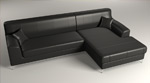 In this tutorial we will continue modelling the next object for our interior creating a leather sofa for the living room. First we will set-up the initial scene inside Autodesk 3ds Max and place a plane which would hold our reference Picture according which we will model. Even though the reference picture is small it will provide us enough guidance for the size and scale of the sofa. Starting creating a plane which will be our initial shape we will slowly adjust and create the first rough shape of the sofa with respect on his details. Using poly-modelling technique and using the advantage of hard surface modelling we will create a low-poly sofa with all details and object we will see on the reference.